


Diabetic Recipes App & Planner
3.8218.00 Reviews
App Specs
- Version
- Varies with Device
- Updated On
- License
- Free
- Downloads
- 100,000+
- Developer
- Riafy Technologies
- Categories
- Food & Drink
- Platform
- Android
Screenshots
 Analysis by AppCompare
I tend to judge a food app by what happens when I am hungry, short on time, and unsure what to cook—not by how impressive its menu sounds. Diabetic Recipes App & Planner is aimed at that everyday moment: finding meal ideas while keeping diabetes and blood sugar in mind. It is a free Food & Drink app from Riafy Technologies, rated for Everyone, and it has been around since October 18, 2013. Its average sits at 3.8 from around 2.8K ratings, so I would treat it as a useful source of ideas rather than assume every user will find it equally convenient.
Where the first snags can happen
The app’s promise combines recipes, planning, and nutrition, which can make it tempting to expect a complete personal diabetes-management system. I would set a narrower expectation: use it to explore meals and organize food choices, not as a replacement for advice from your clinician or a tool for making medication decisions. A recipe’s nutrition information can help you compare options, but it does not make a meal automatically suitable for every person or every care plan.
Another possible sticking point is the gap between an appealing recipe and what is actually in your kitchen. Before committing to a plan, I would check the ingredients and serving details rather than assume a suggested dish fits your budget, preferences, or dietary needs. If a recipe depends on an ingredient you rarely buy, it may be more useful as inspiration than as tonight’s answer.
Setup checks that save time later
When I begin using a meal-planning app, I first look for the simplest task I want it to solve: one breakfast idea, a workday lunch, or a dinner I can repeat. That keeps setup from becoming a project of its own. In this app, I would start by browsing a familiar meal category, then search for a dish I already know I like. It gives me a quick way to judge whether the available recipes feel practical before I invest time arranging several days.
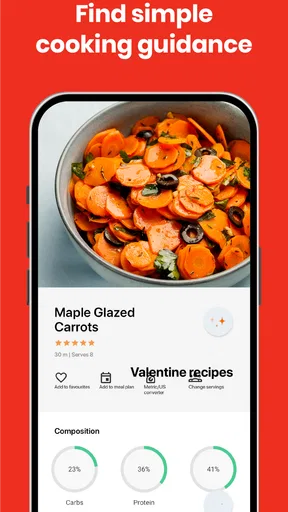
I would also read recipe details before relying on a nutrition figure. Ingredients, portion size, and how a dish is prepared all affect how useful that number is for an individual. If you count carbohydrates or follow a specific eating plan, compare the recipe with the guidance you already use; don’t assume that a general label answers every personal question.
Recovering when a plan stops fitting
Plans often meet real life: a meeting runs late, groceries are missing, or someone else at home wants a different dinner. Rather than trying to preserve a full week exactly as planned, I find it more realistic to treat the plan as a shortlist. Keep a couple of meals that use ingredients you already have, and swap the order when your day changes. That approach makes planning helpful without turning it into another rule to feel guilty about breaking.
If a recipe search does not immediately produce a good match, I would try a broader food term or browse its meal category instead of repeatedly changing the same query. For a shopping list, review it against your pantry before heading out. Lists made from recipes can be convenient, but they may not account for staples you already own or the package sizes sold near you. A quick check prevents duplicate purchases and keeps the plan grounded in your actual kitchen.
Worth Reading Before You Choose

EA SPORTS FC Mobile 26 Is a Bigger Football Game, but It Takes Time

Flipboard Shows What News Apps Must Do Beyond the Feed

Switching to Android Auto Means Rethinking Your Driving Routine

Google Calendar Makes a Crowded Week Easier to Manage

Ludo King Makes the Most of the Minutes Between Plans

Baby Panda World Brings Quick Play to Modern Phones, but Its Game Library Feels Busy
When the problem may be the meal, not the app
A recipe can be clearly written and still be a poor fit for your routine. Preparation time, unfamiliar ingredients, serving size, and personal taste matter just as much as the idea itself. If you keep abandoning a plan, that may be a sign to choose simpler dishes or repeat a dependable meal—not evidence that you have failed at managing food. I would adapt one element at a time so it is easier to tell whether the issue is flavor, effort, or suitability.
Likewise, blood sugar responses vary. The app can help you think through meal options, but your own care team’s instructions should guide decisions about portions and nutrition. Anyone with allergies, a medically prescribed diet, or questions about whether a particular ingredient is appropriate should verify the recipe carefully and ask a qualified professional when needed.
Exploring the Interface
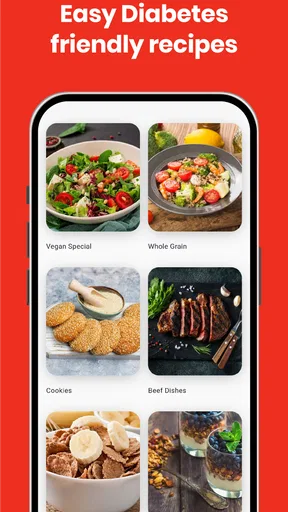
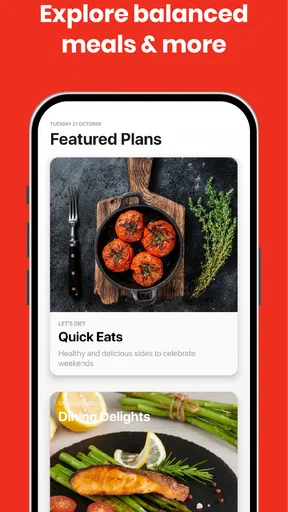
First things first, let’s talk about the interface. The app welcomes you with a clean, user-friendly design that doesn’t overwhelm you with too much text or unnecessary graphics. The navigation is straightforward, and you can easily browse through different sections like recipes, meal plans, and tips. I really appreciate apps that don’t make me feel like I’m solving a puzzle just to find what I need.
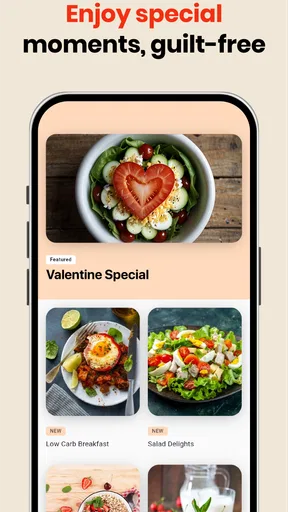
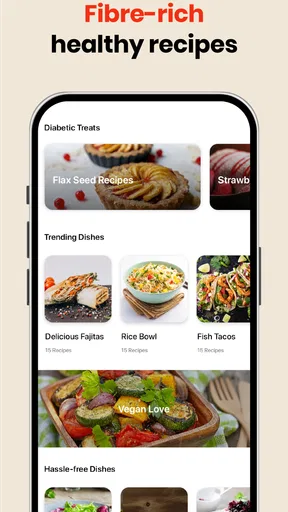
On the home screen, you’ll find an array of recipe categories ranging from breakfast to dinner, and even some delightful snack options. There’s a handy search bar at the top, so if you’re craving something specific, you can find it in a jiffy. And the best part? Each recipe comes with a detailed nutritional breakdown, so you know exactly what you’re putting into your body.
Recipe Variety and Customization
The app boasts a wide variety of recipes that cater to different tastes and preferences. Whether you’re a fan of spicy cuisine or you have a sweet tooth, there’s something for everyone. I was particularly impressed with the international recipes that allow you to enjoy flavors from around the world without leaving your kitchen.
What’s even cooler is the customization feature. You can tweak recipes based on your dietary needs—swap out ingredients, adjust portion sizes, and even save your favorite modifications for future use. It’s like building your own culinary masterpiece while keeping your health in check.
Meal Planning Made Easy
One of the standout features of the Diabetic Recipes App & Planner is, as the name suggests, the meal planning tool. You can plan your meals for the week, which is a game-changer if you’re someone who likes to stay organized. This feature helps you reduce the stress of daily decision-making, especially when managing diabetes.
Simply select the recipes you like, add them to your meal plan, and the app generates a shopping list for you. Talk about convenience! It even allows you to set reminders for meal prep, ensuring you never skip a beat.
Making the plan work in a real kitchen
The most useful way I can see using this is to plan around a few dependable meals rather than fill every slot. For example, on a Sunday evening I might choose a couple of dinners and a breakfast idea, check what ingredients are already at home, and use the shopping list to cover only the gaps. When a weekday gets busy, that preparation gives me a starting point without forcing me to follow a rigid schedule.
There is also a practical trade-off in how much customization is worth doing. Swapping ingredients can make a recipe feel more personal, but a substitution can change its nutritional profile. I would use modifications to accommodate taste or availability, then reassess the recipe details instead of assuming the original breakdown still applies unchanged. Saving a version you enjoy can be handy for later, but it is still sensible to review it when you make a meaningful change.
Compared with a general recipe-search app, this one has a clearer focus on diabetes-conscious meal ideas and planning. A general app may offer a wider range of cuisines or community variations, while a dedicated diabetes-oriented app can make it easier to begin with that dietary concern in mind. Neither approach guarantees a better meal for a particular person. I would choose this app when I want a focused starting point, and use a broader recipe source when I need a very specific cuisine, ingredient filter, or cooking style that I cannot readily find here.
Who is likely to get the most from it?
I think it suits someone who wants help moving from “What can I eat?” to a manageable list of possibilities, especially if meal decisions are a recurring source of stress. It may also help a family member who cooks for someone with diabetes and wants to explore recipes without beginning every search from scratch. The educational tips can add context for a casual reader, while the recipe and planning elements give the app a more practical role than a collection of health articles alone.
It is less suitable for someone expecting a personalized medical plan, precise clinical guidance, or a guarantee that a suggested dish will produce a particular blood sugar result. It may also frustrate cooks who need highly specific allergy controls or who want a flexible recipe database built around unusual ingredients. In those cases, a clinician-approved plan or a specialist resource with the exact filters needed is a better companion. The app can still provide ideas, but I would not make it the only authority.
Cost is another question worth checking before building a routine around it. The app is free to download, but it offers in-app purchases ranging from forty-nine cents to fifty-nine dollars and ninety-nine cents per item. I would first see whether the free experience covers the tasks I actually use, and only consider a purchase if its value is clear to me. That avoids paying simply because a feature sounds useful in theory.
Tips and Educational Content
Beyond recipes and planning, the app is packed with educational content. There are tips on managing diabetes, understanding nutritional labels, and even advice on how to maintain a balanced lifestyle. The information is presented in bite-sized articles, perfect for a quick read while you’re waiting for your pasta to boil.
I found the tips to be quite practical and relatable, making it easier to incorporate them into my daily routine. Having this kind of knowledge at your fingertips is invaluable, especially when you’re navigating through health-related challenges.
For a new user, I would read those short pieces with a specific question in mind—such as how to interpret a label—rather than trying to absorb everything at once. Then I would connect the general advice to the recipes I am considering and, where health decisions are involved, compare it with guidance from my care team. This makes the educational material easier to apply while keeping its role in perspective.
Final Thoughts
Overall, the Diabetic Recipes App & Planner is a fantastic tool for anyone looking to manage their diabetes without compromising on taste or variety. It’s like having a supportive friend who not only understands your dietary needs but also helps you plan and enjoy your meals.
So, if you’re ready to transform your kitchen experience and take control of your health, give this app a try. You might just find yourself exploring new culinary horizons and making delicious memories along the way.
My practical verdict is more measured: I would try it if I wanted a focused source of meal inspiration and a way to bring a few recipes into a weekly routine. Its 100K-plus installs suggest it has reached a substantial audience, though popularity alone cannot tell you whether its approach suits your needs. The rating and the mix of user experiences are a reminder to judge it by your own workflow: can you find meals you would cook, understand the recipe details, and make planning easier rather than more demanding?
If you are deciding whether to keep it, give yourself a small test. Find one recipe for a meal you already need to make, review its ingredients and nutrition, and see whether the planning process saves effort. If it does, build from there; if it does not, you have learned that a different recipe source or a simpler paper plan may fit better. For me, its strongest role is as a practical idea shelf—not a strict schedule or a substitute for individualized diabetes care.
Pros
- Comprehensive recipe collection.
- User-friendly meal planner.
- Nutritional info provided.
- Customizable diet settings.
- Offline access available.
Cons
- Limited international recipes.
- Ads can be intrusive.
- No voice command feature.
- Premium version is pricey.
- Requires account registration.
FAQs for Diabetic Recipes App & Planner
What features does the Diabetic Recipes App & Planner offer?
The Diabetic Recipes App & Planner provides a comprehensive range of features designed to help users manage their dietary needs. It includes a vast collection of diabetes-friendly recipes, a customizable meal planner, nutritional information, and a grocery list generator. These tools are tailored to help users maintain a balanced diet while keeping track of their carbohydrate intake.
Is the Diabetic Recipes App & Planner suitable for all types of diabetes?
Yes, the app is designed to cater to individuals with various types of diabetes, including Type 1, Type 2, and gestational diabetes. It offers meal plans and recipes that focus on managing blood sugar levels, making it a versatile tool for users with different dietary requirements and restrictions.
How user-friendly is the Diabetic Recipes App & Planner for beginners?
The app is designed with simplicity in mind, featuring an intuitive interface that is easy to navigate. Beginners will find step-by-step guides for meal planning and recipe preparation. Additionally, the app provides educational resources, making it easier for users to understand their dietary needs and manage their condition effectively.
Does the Diabetic Recipes App & Planner require an internet connection?
While an internet connection is needed to initially download the app and access updates or new recipes, the core features such as meal planning and saved recipes can be used offline. This makes it convenient for users to plan meals and access their favorite recipes anytime, even without internet access.
Are there any in-app purchases or subscription fees for the Diabetic Recipes App & Planner?
The app offers free access to a wide range of basic features. However, there may be premium features or additional content available through in-app purchases or subscription plans. These extras might include exclusive recipes, advanced meal planning tools, or personalized dietary recommendations, providing added value for users seeking a more tailored experience.


